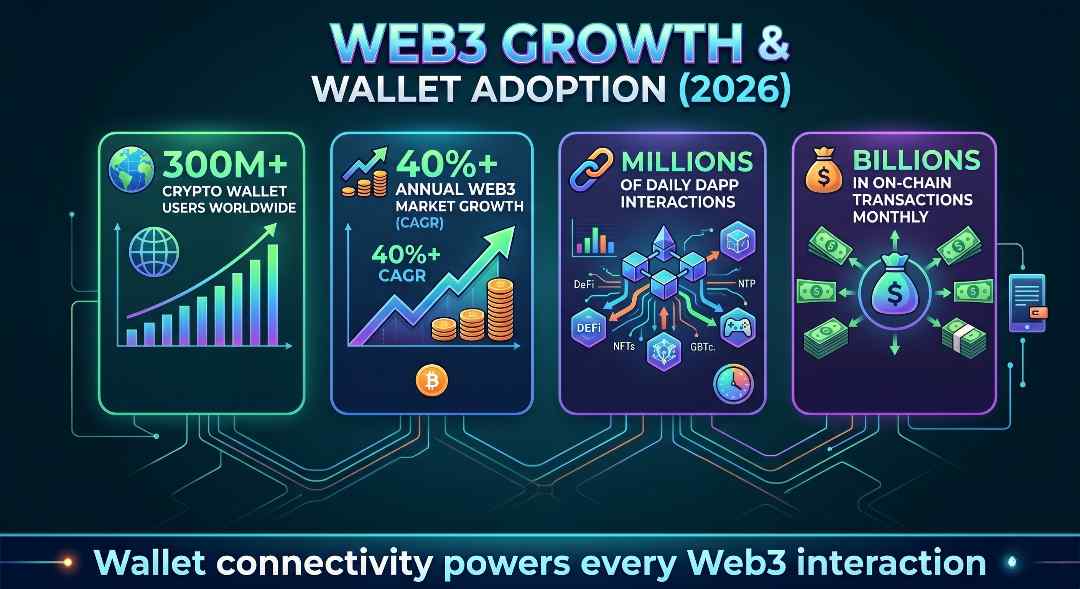
A DApp without wallet access has no starting point. Users need a connected wallet to sign transactions, claim tokens, vote in a DAO, or mint an NFT. This single step controls every on-chain action. In 2026, Web3 has crossed 300 million crypto wallet users worldwide. The market is also projected to grow at more than 40% CAGR, so wallet connectivity now sits at the center of DApp growth.
Many teams still get this part wrong. They miss mobile behavior, desktop flows, chain switching, saved sessions, and user drop-offs. New users often leave before their first transaction. This guide explains how Web3 wallet integration works in 2026. You will learn which wallets to support, which libraries to use, how Web3 login works, and which mistakes to avoid.
The Major Wallets You Need to Support in 2026
You cannot build for one wallet and call it done. Your audience will arrive with different wallets depending on their device, chain preference, and experience level. At minimum, your DApp should support the following.
MetaMask
MetaMask remains the most widely used browser extension wallet. It injects a window.ethereum provider object into the browser, which your DApp reads to detect availability and request account access. MetaMask also supports mobile through its in-app browser, but behavior differs from the desktop extension. Always test both environments. The EIP-1193 standard governs how the provider communicates, so code written to that spec will work across most injected wallets, not just MetaMask.
WalletConnect
WalletConnect is a protocol, not a wallet. It creates an encrypted bridge between your DApp and a mobile wallet by scanning a QR code or using a deep link. This makes it the right choice for reaching participants who prefer hardware wallets or mobile-first apps like Trust Wallet, Rainbow, or MetaMask Mobile outside its in-app browser. WalletConnect v2 (now the active standard) supports multi-chain sessions, meaning a single connection can span multiple networks. If your DApp operates across EVM and non-EVM chains, WalletConnect v2 is worth prioritizing.
Coinbase Wallet
Coinbase Wallet has a large installed base, particularly among participants entering Web3 through centralized exchange onboarding. It supports both the injected provider model and WalletConnect. The Coinbase Wallet SDK gives you a direct integration path with smart wallet features that simplify the experience for less experienced participants.
Choosing Your Integration Approach
Direct Provider Injection
The simplest approach: detect window.ethereum, call eth_requestAccounts, and you have a connected address. This works for MetaMask and other injected wallets. It is fine for a quick prototype, but it does not scale well. You get no built-in support for WalletConnect, no fallback UI, and no session management.
if (typeof window.ethereum !== 'undefined') {
  const accounts = await window.ethereum.request({
    method: 'eth_requestAccounts'
  });
  console.log('Connected:', accounts[0]);
}
Aggregator Libraries
For production DApps, use an aggregator library. These handle provider detection, wallet selection UI, session persistence, and chain switching across multiple wallets from a single integration point.
The most widely adopted options in 2026:
| Library | Best For | Notes |
|---|---|---|
| RainbowKit | React-based DApps | Polished UI, built on wagmi, strong community |
| ConnectKit | React-based DApps | Minimal design, also built on wagmi |
| Web3Modal (WalletConnect) | Framework-agnostic | Supports WalletConnect v2, broad wallet coverage |
| wagmi | Headless React hooks | Build your own UI on top of solid connection logic |
| ethers.js / viem | Low-level control | Not aggregators, but foundational provider libraries |
RainbowKit and wagmi together are a common production stack for EVM DApps. Web3Modal works well when you need framework flexibility or want WalletConnect’s full protocol support out of the box.
Step-by-Step: Connecting a Wallet to Your DApp
Here is the general flow, regardless of which library you use:
- Detect or prompt wallet availability: Check for window.ethereum for injected wallets. For WalletConnect, initialize the client with your project ID from the WalletConnect Cloud dashboard.
- Present a wallet selection modal: Show the participant their available options. Do not auto-connect without consent this creates trust issues and can conflict with EIP-1102.
- Request account access: Call eth_requestAccounts (injected) or trigger the WalletConnect pairing flow. The wallet prompts the participant to approve.
- Read the connected address and chain ID: Store these in your app state. You need both to validate that the participant is on the correct network before any transaction.
- Listen for account and chain changes: Wallets emit accountsChanged and chainChanged events. Your DApp must handle both update state, re-validate permissions, and avoid stale data.
- Handle disconnection gracefully: Clear session state when the participant disconnects. Do not assume the connection persists across page reloads without explicitly checking.
window.ethereum.on('accountsChanged', (accounts) => {
  if (accounts.length === 0) {
    // Wallet disconnected
    clearSession();
  } else {
    updateConnectedAccount(accounts[0]);
  }
});

window.ethereum.on('chainChanged', (chainId) => {
  // Reload or re-validate for the new chain
  handleChainChange(chainId);
});
Ready to connect your DApp with Web3 wallets?
Connect wallets fast, support top networks, and give users a smooth login flow from the first click.

Web3 Authentication: Signing Messages Instead of Storing Passwords
Once a wallet is connected, you have an address. That address proves ownership of a public key but it does not prove the person is who they claim to be in your application context. For DApps that need identity (gated content, dashboards, personalized data), you need Web3 authentication.
The standard approach is Sign-In with Ethereum (SIWE), defined in EIP-4361. The flow works like this:
- Your backend generates a nonce and a structured message.
- You ask the wallet to sign that message using personal_sign.
- The participant signs without broadcasting a transaction no gas required.
- Your backend verifies the signature against the claimed address.
- On success, issue a session token (JWT or similar).
const message = `Sign in to MyDApp\nNonce: ${nonce}\nIssued At: ${new Date().toISOString()}`;

const signature = await window.ethereum.request({
  method: 'personal_sign',
  params: [message, address]
});

// Send address + signature to your backend for verification
This approach is stateless from the blockchain’s perspective, costs nothing in gas, and gives you a verifiable identity without passwords. Libraries like siwe (npm) handle message construction and server-side verification so you do not have to implement the cryptography yourself.
Handling Chain Switching and Multi-Chain Support
Most DApps target specific networks. If a participant connects on the wrong chain, transactions will fail or land in the wrong place. You need to detect the active chain and prompt a switch when necessary.
Use wallet_switchEthereumChain to request a network change:
await window.ethereum.request({
  method: 'wallet_switchEthereumChain',
  params: [{ chainId: '0x89' }] // Polygon Mainnet
});
If the chain is not already in the wallet, use wallet_addEthereumChain to register it first. Always handle the error case where the participant rejects the switch disable transaction buttons and show a clear message rather than letting the UI hang.
For multi-chain DApps, WalletConnect v2’s multi-chain session support is worth the added setup. It lets participants authorize access across several networks in a single pairing, which reduces friction compared to prompting a chain switch mid-session.
Common Integration Mistakes to Avoid
Even experienced teams make these errors. Watch for them before you ship.
- Assuming window.ethereum is MetaMask: Multiple extensions can inject into the same object. Use window.ethereum.isMetaMask only as a hint, not a guarantee. Aggregator libraries handle this detection more reliably.
- Not handling mobile: MetaMask Mobile’s in-app browser behaves differently from the extension. WalletConnect deep links behave differently from QR codes. Test on actual mobile devices, not just desktop simulators.
- Blocking the UI on wallet detection: If no wallet is detected, show a helpful prompt do not render a broken page. Offer WalletConnect as a fallback for participants without an injected wallet.
- Ignoring session persistence: Participants expect to stay connected across page refreshes. Use localStorage or a state management library to restore sessions, but re-verify the connection is still active on load.
- Skipping error handling on eth_requestAccounts: Participants can reject the connection prompt. Catch that rejection and update your UI state accordingly do not leave the connect button in a loading state indefinitely.
- Hardcoding chain IDs: Chain IDs should be configurable, especially if you plan to support testnets during development and multiple mainnets in production.
When to Build a Custom Wallet Solution
Standard wallet integrations cover most DApp use cases. But some products need more control embedded wallets, social login flows, or wallet abstraction for participants who have never held crypto before.
Account abstraction (ERC-4337) makes this practical in 2026. It lets you create smart contract wallets that support gasless transactions, session keys, and recovery mechanisms. Libraries like Biconomy, ZeroDev, and Alchemy’s Account Kit provide SDKs for building on top of this standard.
If your DApp targets mainstream audiences not crypto-native participants embedded wallets with email or social login (Privy, Dynamic, Magic) dramatically lower the onboarding barrier. The trade-off is added complexity and dependency on third-party infrastructure.
Choose custom wallet solutions when:
- Your audience is unlikely to have an existing Web3 wallet
- You need gasless transactions as a core UX requirement
- You are building a consumer product where seed phrase management is a dealbreaker
- Your product requires session-based permissions or delegated transaction signing
If you are building a DeFi protocol or NFT marketplace targeting existing Web3 participants, standard wallet integration with a solid aggregator library is almost always the right call.
If your team needs help architecting wallet integration as part of a larger DApp build, Blockchain App Factory has delivered 800+ Web3 projects across DeFi, NFT, GameFi, and exchange platforms. Their team of 90+ certified blockchain experts handles everything from smart contract development to full dApp connectivity worth a conversation if you are building at scale.
Conclusion
Wallet integration is not a checkbox it is the core of your DApp’s user experience. Get it wrong and participants bounce before they ever interact with your product. Get it right and the rest of your on-chain functionality has a solid foundation to build on.
Start with a production-grade aggregator library, support at least MetaMask and WalletConnect from day one, implement SIWE for any authenticated features, and handle edge cases like chain switching and session persistence before you ship. If your product targets mainstream audiences, evaluate account abstraction early rather than retrofitting it later.
For teams building complex DApps who need experienced hands on the wallet layer and everything above it, learn more at www.blockchainappfactory.com.
FAQs
What is the difference between WalletConnect and MetaMask integration?
MetaMask is a specific wallet that injects a provider object (window.ethereum) into the browser. WalletConnect is a protocol that connects any compatible mobile wallet to your DApp via QR code or deep link. Supporting both gives you the widest possible coverage across desktop and mobile participants.
Do I need to support multiple wallets in my DApp?
Yes, if you want to reach a broad audience. Different participants use different wallets based on their device, chain, and experience level. Aggregator libraries like RainbowKit or Web3Modal make multi-wallet support straightforward without writing separate integration code for each wallet.
What is Sign-In with Ethereum (SIWE) and when should I use it?
SIWE (EIP-4361) is a standard for authenticating participants using their Ethereum wallet instead of a username and password. Use it when your DApp needs to associate on-chain identity with off-chain data dashboards, gated content, personalized settings, or any feature that requires a persistent session.
How do I handle participants who reject the wallet connection prompt?
Catch the error returned by eth_requestAccounts (error code 4001 means the participant rejected the request) and update your UI to reflect the disconnected state. Never leave the interface in a loading state. Offer the participant a clear way to retry.
What is account abstraction and does my DApp need it?
Account abstraction (ERC-4337) lets you create smart contract wallets with features like gasless transactions, social recovery, and session keys. Most DApps targeting crypto-native audiences do not need it. It becomes valuable when you are building for mainstream participants who find seed phrases and gas fees confusing.
How do I prevent stale wallet state after a page reload?
Store the connected address and chain ID in localStorage or your state management layer. On page load, check whether the stored address is still authorized by calling eth_accounts (not eth_requestAccounts this does not trigger a prompt). If the wallet returns the address, restore the session silently. If not, clear the stored state and show the connect button.
Which library should I use for wallet integration in a React DApp in 2026?
The most common production stack is wagmi combined with either RainbowKit or ConnectKit. wagmi provides the underlying React hooks for connection, signing, and contract interaction. RainbowKit and ConnectKit add a polished wallet selection modal on top. For non-React projects, Web3Modal from WalletConnect is a solid framework-agnostic option.

Vimal J is the Head of Sales at Blockchain App Factory, with 10+ years of experience in sales, client strategy, and Web3 business growth. He helps startups, enterprises, and project founders choose the right blockchain solutions for their goals, bringing a practical market perspective to topics like token development, crypto launches, and Web3 adoption.